
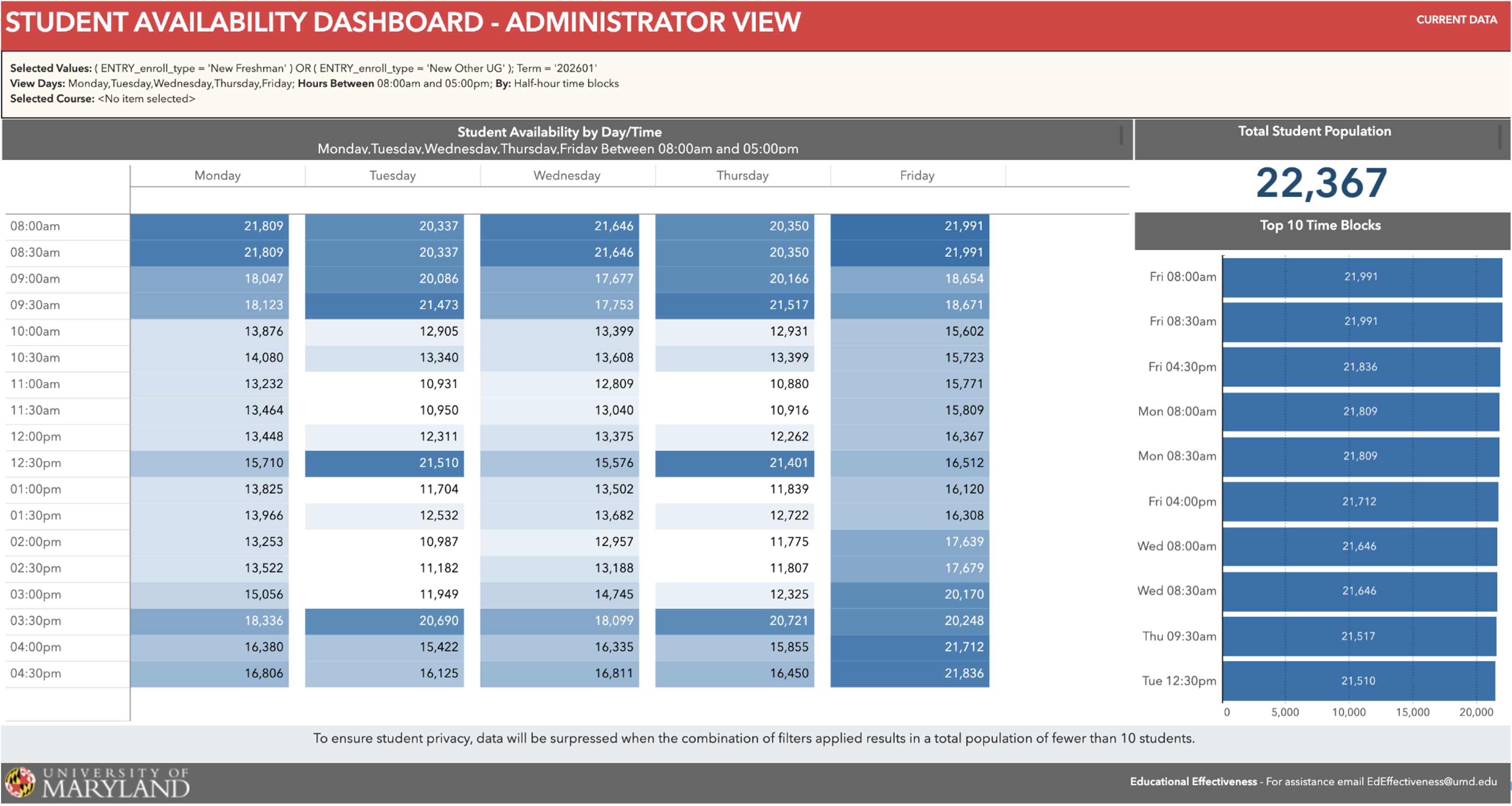
The Student Availability Dashboard for Administrators displays student availability based on course schedules for the current and next term, filterable by demographics (college, major, entry type, year) and registration details like courses and sections. Users can view availability in hour or half-hour blocks and filter by specific course/section, preferred times, or days.
It facilitates scheduling activities outside of class by showing when target student populations are most available, maximizing attendance for events involving large, specific groups (e.g., all first-year aeronautical engineering transfers, all graduate students in BSOS).
Current/Potential Outcomes
- Administrators will have a much easier time planning events for groups of their majors at a time when the students are more likely to be able to attend.
Users
- Assistant and Associate Deans, Graduate and Undergraduate program directors, Directors of Assistant/Associate Deans, Graduate/Undergraduate program directors, Directors of special programs, and others who organize events for specific student groups to share information, build community, or provide opportunities.
Accessing the Tool
- This dashboard is now fully up and running! If you are an administrator please refer to this document to learn more about what the tool can do and see instructions on how to request access.